Architecture of the tool
Package Content
The package has 8 folders and 4 files in its root:
data: data files used in some the use examples in the package
doc: user and reference documentations
notebooks: jupyter notebooks with documented tutorials exploring the tool features
s2v and s5: sources of analysis tools
src: sources of LightVegeManager
tests: unit testing files written in pytest format
.gitignore: files and folders to ignore by git
.readthedocs.yaml: config file for read-the-docs
requirements.txt: packages needed for read-the-docs in order to compile
README.md: Read Me file
pytest.ini: config file for pytest
setup.py: setup script used for installation
Code structure
The code structure of the tool is designed with a main class LightVegeManager, which calls modules for computing specific parts depending on the inputs.
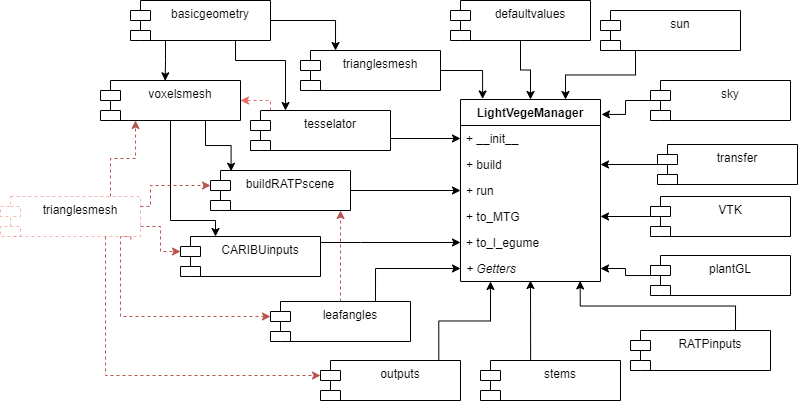
Dependances between modules
Modules are:
LightVegeManager_toolMain class of the tool. Calls all the other modules insrc.
LightVegeManager_CARIBUinputsManages and prepares input information for CARIBU.
LightVegeManager_RATPinputsManage vegetation and meteo input informations for RATP
LightVegeManager_RiRi5inputsManage grid of voxels for RiRi5
LightVegeManager_VTKWrites VTK files from LightVegeManager geometry and lighting data. Used for visualisation
LightVegeManager_basicgeometryProvides basic geometric operations in 3D used by LightVegeManager.
LightVegeManager_buildRATPsceneBuild a PyRATP.grid from inputs.
LightVegeManager_defaultvaluesDefault for simulation fixed parameters
LightVegeManager_leafanglesHandles leaf angle distribution, both in its dynamic computing or reading a file
LightVegeManager_outputsManages and reformats output results from the light models in pandas.Dataframe with similar columns names
LightVegeManager_plantGLVisualisation with plantGL
LightVegeManager_skyBuild a sky from LightVegeManager input informations
LightVegeManager_stemsManages stems element
LightVegeManager_sunBuild a sun respecting each light model format
LightVegeManager_tesselatorManages subdivision of a triangulation
LightVegeManager_transferManages transfer of LightVegeManager results to plant Models
LightVegeManager_trianglesmeshBuilds and handles triangulation mesh.
LightVegeManager_voxelsmeshBuilds and handles axis oriented voxels mesh
Front End: the main commands
th tool is used through the class LightVegeManager and the following methods:
constructor
__init__builds the sky, which stays the same throughout all the simulation. It sets also default values if not precised in the inputs.
build()creates a common geometric scene from inputs and set parameters for the light model.
run()computes the lighting.
The outputs from radiations are automatically gathered in a pandas Dataframe and accessible from the getters elements_outputs(), triangles_outputs() and voxels_outputs().
As part of our initial objective, we added two methods in order to convert the results in formats understandable by CN-Wheat and l-egume:
to_MTG(), which updates a MTG table read by CN-Wheat
to_l_egume(), which updates two tables read by l-egume
Note
l-egume needs a local information of transmitted lighting among a voxel grid. Then, you need to provide the grid dimensions to LightVegeManager.
The other getters available are:
sensors_outputs(), outputs of virtual sensors, only with CARIBU
soilenergy(), radiation received by the soil, only with CARIBU
sun(), object containing sun position xyz
maxtrianglearea(), if you entered a triangle mesh, return the largest triangle
tesselationtime(), if you activated tesselation of a triangle mesh (redraw of triangles), return computation time
modelruntime(), return the computation time of the light model
Finally, you also have additional tools available for analysing the inputs and visualising the outputs (additional tools).
Back End: More details about how the tool works
First of all, the geometric merging is set in a Caribu scene format. It is a dict where keys are indices and values are list of triangles, one triangle is list of 3 3-tuple representing the vertices. Here is an example:
# organ 1
triangle1 = [(0,0,0), (0,1,0), (1,1,0)]
triangle2 = [(0,0,0), (0,1,1), (1,1,1)]

# organ 2
triangle3 = [(0,0,2), (0,1,2), (1,1,2)]

caribuscene = { 1 : [triangle1, triangle2] ,
                2 : [triangle3] }
We choose this format for its low processing cost, because it uses basic python objects.
We also save and recreate a dict to organize the indices inside each input scene called matching_ids (index managment).
The input parameters defines a common way for setting each light model parameters.
Geometric merging
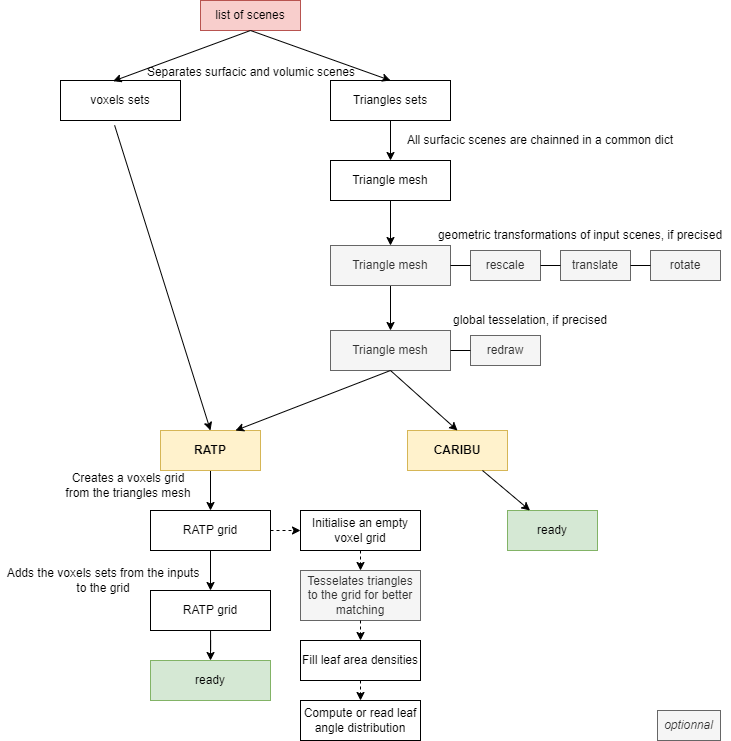
Tool workflow for geometry
We built a module to tesselate one triangle into four smaller triangles. The tesselation is applied either uniformly among all the triangle mesh or on a sides of a voxels grid. The tesselation following a grid is made in order to have a better matching of triangles in a voxels grid and attenuate the error of converting the mesh type.
We also built the possibility to compute dynamicaly the leaf angle distribution, either globally among all triangles, or locally inside each voxel.
Managing indexes
LightVegeManager expects a list of geometric scenes in its inputs. Each scene represents a plant specy.
Each scene can also by sorted by elements, which can represent plant organs or just sets of triangles.
The tool will then reorder all the indexes in order to avoid any confusion.
The correspondance between input indices and new indices is stored in the dict attribute matching_ids.
Example of reordering:
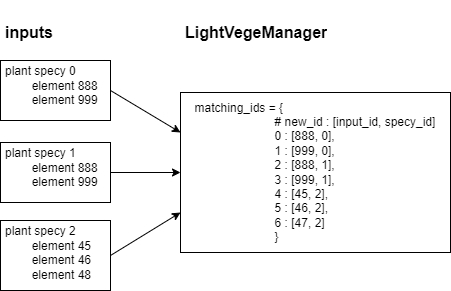
Reordering indices in LightVegeManager
Triangle subdivision
We implemented an algorithm for subdividing a triangle in 4 triangles according to triangle position in a grid of voxels. The goal was to have a better matching between a triangulation and a grid of voxels. Triangles are subdivided if they are between several voxels.
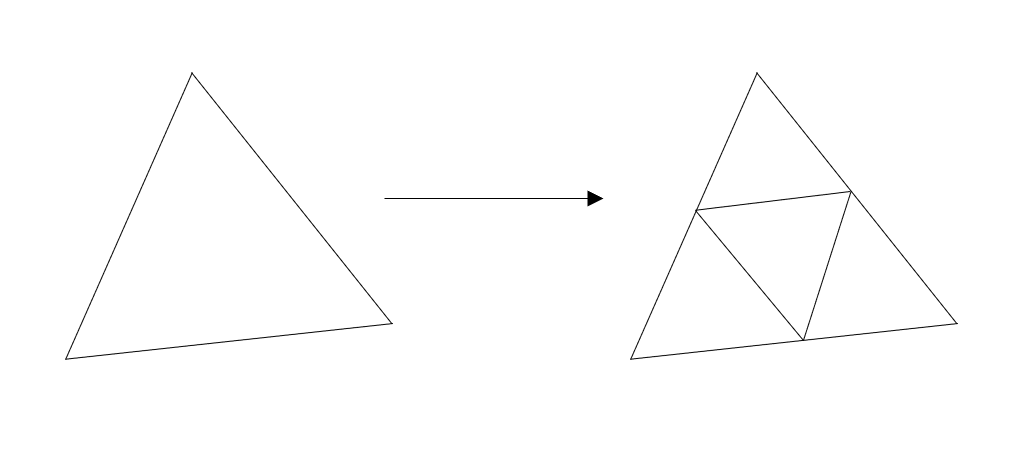
Subdivision of a triangle
CARIBU, l-egume and virtual sensors
l-egume needs two different values to understand lighting results:
total intercepted radiation for each plant
local transmitted radiation following a voxel grid
In order to use CARIBU with l-egume, you need to retrieve transmitted radiations for each position of a voxel grid. LightVegeManager implements functions which can create a set of virtual sensors following a voxel grid. Then, with the virtual sensors and the soilmesh options activated, you can calculate the local transmitted radiation. Make sure to have the same grid dimensions as l-egume intern grid.