3. Geometric inputs
3.1. Content
input formats
Dict of triangles
PlantGL scene
VGX file
Voxels grid
MTG object from adelwheat
RATP inputs
RiRi5 inputs
organization levels: species and organs
stems management
geometric transformations
3.2. Introduction
The main purpose of this tool was to merge several geometric scenes in various formats and apply a radiative modelling on it. Here, we will precise the different possiblities for manipulating geometry.
[1]:
from lightvegemanager.LVM import LightVegeManager
from pgljupyter import SceneWidget
[2]:
# Environment parameters for this notebook
longitude = 2.
latitude = 46.
timezone = 1
coordinates = [latitude, longitude, timezone]
infinite = False
reflected = False
direct = False
diffuse = True
sky = "turtle46"

environment = {
                "coordinates": coordinates ,
                "infinite": infinite,
                "reflected": reflected,
                "direct": direct,
                "diffuse": diffuse,
                "sky": sky
                }
3.3. Inputs Formats
In this section, we won’t present single triangle and list of triangles as input geometry, as they were present in the tool_basics.ipynb notebook. Also, these two formats can be direct inputs of the geometry argument of the build method, unlike the following formats which needs to be included in a list, such as:
geometry = { "scenes": [scene1, scene2, ...] }
3.3.1. dict of triangles
A mesh of triangles can be represented as a dict, where each key is an organ ID and its value, a list of triangles belonging to the organ. A triangle is a list of a 3 vertices represented by (x,y,z)points.
In this example, we will generate random 3D triangles for 3 differents organs.
[12]:
from lightvegemanager.trianglesmesh import random_triangle_generator

spheresize = (10., 2.)
organized_triangles = {
    111: [random_triangle_generator(spheresize=spheresize, worldsize=(0,20)) for i in range(20)],
    222: [random_triangle_generator(spheresize=spheresize, worldsize=(20,50)) for i in range(30)],
    333: [random_triangle_generator(spheresize=spheresize, worldsize=(50,100)) for i in range(10)],
}
Input geometry looks like:
[4]:
geometry = {
    "scenes": [organized_triangles]
}
Then, we compute lighting and run a visualization of the scene.
Note: elements_outputs method will return a Dataframe where results are integrated on each organ.
[5]:
lighting = LightVegeManager(lightmodel="caribu", environment=environment)
lighting.build(geometry=geometry)

# compute the lighting
energy = 500.
hour = 15
day = 264
lighting.run(energy=energy, hour=hour, day=day)
print(lighting.elements_outputs)
SceneWidget(lighting.to_plantGL(lighting=True),
            position=(-50.0, -50.0, 0.0),
            size_display=(600, 400),
            plane=True,
            size_world = 100,
            axes_helper=True)
   Day  Hour  Organ  VegetationType        Area    par Eabs      par Ei
0  264    15    111               0  812.660080  254.783023  299.744733
1  264    15    222               0  906.791550  326.191765  383.755017
2  264    15    333               0  456.917637  368.655503  433.712356
[5]:
3.3.2. PlantGL scene
A plantGL Scene is a list of plantGL Shape which can be considered as organ. The ID of the plantGL Shape are stored as organs ID.
[7]:
import openalea.plantgl.all as pgl

pgl_scene = pgl.Scene([pgl.Shape(pgl.Box(), pgl.Material(), 888),
                        pgl.Shape(pgl.Translated((0,0,1), pgl.Cylinder()), pgl.Material(), 999)])
[8]:
geometry = {
    "scenes": [pgl_scene]
}
lighting = LightVegeManager(lightmodel="caribu", environment=environment)
lighting.build(geometry=geometry)
lighting.run(energy=energy, hour=hour, day=day)
print(lighting.elements_outputs)
SceneWidget(lighting.to_plantGL(lighting=True),
            position=(0.0, 0.0, 0.0),
            size_display=(600, 400),
            plane=True,
            size_world = 5,
            axes_helper=True)
   Day  Hour  Organ  VegetationType      Area    par Eabs      par Ei
0  264    15    888               0  6.000000  159.643042  187.815343
1  264    15    999               0  4.475681  185.076017  217.736490
[8]:
3.3.3. VGX file
The tool can read a VGX file as an input entry. It extracts triangles which are considered as leaves, following its colors, if Red != 42 . All triangles are stored in the same organ, where its ID is set to 0.
[5]:
import os

vgx_path = os.path.join(os.path.dirname(os.path.abspath("")), "data", "NICatObs1P2.vgx")
vgx_path
[5]:
'C:\\Users\\mwoussen\\cdd\\codes\\dev\\lightvegemanager\\data\\NICatObs1P2.vgx'
[7]:
geometry = {
    "scenes": [vgx_path]
}
# compute the lighting
energy = 500.
hour = 15
day = 264
lighting = LightVegeManager(lightmodel="caribu", environment=environment)
lighting.build(geometry=geometry)
lighting.run(energy=energy, hour=hour, day=day)
print(lighting.elements_outputs)
SceneWidget(lighting.to_plantGL(lighting=True),
            position=(0.0, 0.0, 0.0),
            size_display=(600, 400),
            plane=True,
            size_world = 100,
            axes_helper=True)
   Day  Hour  Organ  VegetationType         Area    par Eabs      par Ei
0  264    15      0               0  6062.836763  193.704509  227.887658
[7]:
3.3.4. Grid of voxels
A voxel grid is represented as a dict of two entries: - "LA" corresponding to leaf area, is a table (numpy.array) of dimension $:nbsphinx-math:text{number of species} \times `:nbsphinx-math:text{number of z layers}` \times `:nbsphinx-math:text{number of x layers}` \times `:nbsphinx-math:text{number of y layers}` $ - "distrib" corresponding to leaf angle distribution, is a list of list, where is entered a leaf angle distribution
for each specy
Grid dimensions and voxel size are set in the input parameters of RATP.
[7]:
import numpy

l_scene = {"LA": numpy.ones([2, 3, 4, 4]), "distrib": [[0.5, 0.5], [0.3, 0.7]]}
[16]:
geometry = {
    "scenes": [vgx_path]
}
ratp_parameters = {
    "voxel size" : [20.] * 3
}
lighting = LightVegeManager(lightmodel="ratp", environment=environment, lightmodel_parameters=ratp_parameters)
lighting.build(geometry=geometry)
lighting.run(energy=energy, hour=hour, day=day)
print(lighting.elements_outputs)
SceneWidget(lighting.to_plantGL(lighting=True, printtriangles=False, printvoxels=True),
            position=(0.0, 0.0, 0.0),
            size_display=(600, 400),
            plane=True,
            size_world = 100,
            axes_helper=True)
     Day  Hour  Organ  VegetationType         Area        PARa  Intercepted  \
0  264.0  15.0      0               1  6062.836763  307.604456   215.922903

   Transmitted   SunlitPAR  SunlitArea   ShadedPAR  ShadedArea
0   215.922903  307.604461  252.377915  307.604461  126.601372
[16]:
3.3.5. MTG object from adelwheat
Finally, you can also give a MTG object with a "scene" property. The package adelwheat offers such objects.
[8]:
from alinea.adel.adel_dynamic import AdelDyn
from alinea.adel.echap_leaf import echap_leaves
INPUTS_DIRPATH = os.path.join(os.path.dirname(os.path.abspath("")), "data")
adel_wheat = AdelDyn(seed=1, scene_unit="m", leaves=echap_leaves(xy_model="Soissons_byleafclass"))
g = adel_wheat.load(dir=INPUTS_DIRPATH)
[18]:
geometry = {
    "scenes": [g]
}
lighting = LightVegeManager(lightmodel="caribu", environment=environment)
lighting.build(geometry=geometry)
lighting.run(energy=energy, hour=hour, day=day)
print(lighting.elements_outputs)
SceneWidget(lighting.to_plantGL(lighting=True),
            position=(0.0, 0.0, 0.0),
            size_display=(600, 400),
            plane=True,
            size_world = 0.1,
            axes_helper=True)
   Day  Hour  Organ  VegetationType      Area    par Eabs      par Ei
0  264    15     19               0  0.000228  159.208612  187.304249
1  264    15     34               0  0.000013   80.953500   95.239412
2  264    15    813               0  0.000194  385.317031  453.314154
3  264    15    814               0  0.000240  367.646906  432.525772
4  264    15     51               0  0.000284  347.458387  408.774573
[18]:
3.3.6. RATP inputs
All the above scenes can be geometric inputs if the lightmodel argument is set to "ratp".
[21]:
geometry = {
    "scenes": [g]
}
lighting = LightVegeManager(lightmodel="ratp", environment=environment)
lighting.build(geometry=geometry)
lighting.run(energy=energy, hour=hour, day=day)
print(lighting.elements_outputs)
SceneWidget(lighting.to_plantGL(lighting=True, printvoxels=True),
            position=(0.0, 0.0, 0.0),
            size_display=(600, 400),
            plane=True,
            size_world = 0.1,
            axes_helper=True)
     Day  Hour  Organ  VegetationType      Area        PARa  Intercepted  \
0  264.0  15.0     19               1  0.000228  435.713379     0.000693
1  264.0  15.0     34               1  0.000013  435.713379     0.000693
2  264.0  15.0    813               1  0.000194  435.713379     0.000693
3  264.0  15.0    814               1  0.000240  441.368498     0.000288
4  264.0  15.0     51               1  0.000284  435.713379     0.000693

   Transmitted   SunlitPAR  SunlitArea   ShadedPAR  ShadedArea
0     0.000693  435.713379    0.000776  435.713379    0.000019
1     0.000693  435.713379    0.000776  435.713379    0.000019
2     0.000693  435.713379    0.000776  435.713379    0.000019
3     0.000288  441.368498    0.000322  441.368498    0.000007
4     0.000693  435.713379    0.000776  435.713379    0.000019
[21]:
3.3.7. RiRi5 inputs
RiRi5 can have the same inputs as RATP.
A scene grid of voxels must have exactly 9 angle classes for its leaf angle distribution, and at least one empty layer above the canopy.
Triangles mesh inputs are processed through the RATP pipeline, then is converted to RiRi5.
[9]:
import numpy

l_scene = {"LA": numpy.ones([2, 3, 4, 4]), "distrib": [[0.1, 0.2, 0.1, 0.1, 0.05, 0.05, 0.1, 0.2, 0.1],
                                                        [0.1, 0.1, 0.1, 0.1, 0.05, 0.1, 0.2, 0.2, 0.05]]}
for i in range(4):
    for j in range(4):
        l_scene["LA"][0][0][i][j] = 0.
        l_scene["LA"][1][0][i][j] = 0.
[10]:
geometry = {
    "scenes": [l_scene]
}
lighting = LightVegeManager(lightmodel="riri5", environment=environment)
lighting.build(geometry=geometry)
lighting.run(energy=energy, hour=hour, day=day)
[21]:
print(lighting.riri5_intercepted_light)
[[[[  0.           0.           0.           0.        ]
   [  0.           0.           0.           0.        ]
   [  0.           0.           0.           0.        ]
   [  0.           0.           0.           0.        ]]

  [[208.05400092 208.05400092 208.05400092 208.05400092]
   [208.05400092 208.05400092 208.05400092 208.05400092]
   [208.05400092 208.05400092 208.05400092 208.05400092]
   [208.05400092 208.05400092 208.05400092 208.05400092]]

  [[ 33.75896074  33.75896074  33.75896074  33.75896074]
   [ 33.75896074  33.75896074  33.75896074  33.75896074]
   [ 33.75896074  33.75896074  33.75896074  33.75896074]
   [ 33.75896074  33.75896074  33.75896074  33.75896074]]]


 [[[  0.           0.           0.           0.        ]
   [  0.           0.           0.           0.        ]
   [  0.           0.           0.           0.        ]
   [  0.           0.           0.           0.        ]]

  [[207.34450322 207.34450322 207.34450322 207.34450322]
   [207.34450322 207.34450322 207.34450322 207.34450322]
   [207.34450322 207.34450322 207.34450322 207.34450322]
   [207.34450322 207.34450322 207.34450322 207.34450322]]

  [[ 33.2079505   33.2079505   33.2079505   33.2079505 ]
   [ 33.2079505   33.2079505   33.2079505   33.2079505 ]
   [ 33.2079505   33.2079505   33.2079505   33.2079505 ]
   [ 33.2079505   33.2079505   33.2079505   33.2079505 ]]]]
[22]:
print(lighting.riri5_transmitted_light)
[[[500.         500.         500.         500.        ]
  [500.         500.         500.         500.        ]
  [500.         500.         500.         500.        ]
  [500.         500.         500.         500.        ]]

 [[ 84.60149586  84.60149586  84.60149586  84.60149586]
  [ 84.60149586  84.60149586  84.60149586  84.60149586]
  [ 84.60149586  84.60149586  84.60149586  84.60149586]
  [ 84.60149586  84.60149586  84.60149586  84.60149586]]

 [[ 17.63458462  17.63458462  17.63458462  17.63458462]
  [ 17.63458462  17.63458462  17.63458462  17.63458462]
  [ 17.63458462  17.63458462  17.63458462  17.63458462]
  [ 17.63458462  17.63458462  17.63458462  17.63458462]]]
[12]:
geometry = {
    "scenes": [organized_triangles]
}

lighting.build(geometry=geometry)
lighting.run(energy=energy, hour=hour, day=day)
[13]:
print(lighting.riri5_intercepted_light)
[[[[0. 0. 0. ... 0. 0. 0.]
   [0. 0. 0. ... 0. 0. 0.]
   [0. 0. 0. ... 0. 0. 0.]
   ...
   [0. 0. 0. ... 0. 0. 0.]
   [0. 0. 0. ... 0. 0. 0.]
   [0. 0. 0. ... 0. 0. 0.]]

  [[0. 0. 0. ... 0. 0. 0.]
   [0. 0. 0. ... 0. 0. 0.]
   [0. 0. 0. ... 0. 0. 0.]
   ...
   [0. 0. 0. ... 0. 0. 0.]
   [0. 0. 0. ... 0. 0. 0.]
   [0. 0. 0. ... 0. 0. 0.]]

  [[0. 0. 0. ... 0. 0. 0.]
   [0. 0. 0. ... 0. 0. 0.]
   [0. 0. 0. ... 0. 0. 0.]
   ...
   [0. 0. 0. ... 0. 0. 0.]
   [0. 0. 0. ... 0. 0. 0.]
   [0. 0. 0. ... 0. 0. 0.]]

  ...

  [[0. 0. 0. ... 0. 0. 0.]
   [0. 0. 0. ... 0. 0. 0.]
   [0. 0. 0. ... 0. 0. 0.]
   ...
   [0. 0. 0. ... 0. 0. 0.]
   [0. 0. 0. ... 0. 0. 0.]
   [0. 0. 0. ... 0. 0. 0.]]

  [[0. 0. 0. ... 0. 0. 0.]
   [0. 0. 0. ... 0. 0. 0.]
   [0. 0. 0. ... 0. 0. 0.]
   ...
   [0. 0. 0. ... 0. 0. 0.]
   [0. 0. 0. ... 0. 0. 0.]
   [0. 0. 0. ... 0. 0. 0.]]

  [[0. 0. 0. ... 0. 0. 0.]
   [0. 0. 0. ... 0. 0. 0.]
   [0. 0. 0. ... 0. 0. 0.]
   ...
   [0. 0. 0. ... 0. 0. 0.]
   [0. 0. 0. ... 0. 0. 0.]
   [0. 0. 0. ... 0. 0. 0.]]]]
[14]:
print(lighting.riri5_transmitted_light)
[[[500. 500. 500. ... 500. 500. 500.]
  [500. 500. 500. ... 500. 500. 500.]
  [500. 500. 500. ... 500. 500. 500.]
  ...
  [500. 500. 500. ... 500. 500. 500.]
  [500. 500. 500. ... 500. 500. 500.]
  [500. 500. 500. ... 500. 500. 500.]]

 [[500. 500. 500. ... 500. 500. 500.]
  [500. 500. 500. ... 500. 500. 500.]
  [500. 500. 500. ... 500. 500. 500.]
  ...
  [500. 500. 500. ... 500. 500. 500.]
  [500. 500. 500. ... 500. 500. 500.]
  [500. 500. 500. ... 500. 500. 500.]]

 [[500. 500. 500. ... 500. 500. 500.]
  [500. 500. 500. ... 500. 500. 500.]
  [500. 500. 500. ... 500. 500. 500.]
  ...
  [500. 500. 500. ... 500. 500. 500.]
  [500. 500. 500. ... 500. 500. 500.]
  [500. 500. 500. ... 500. 500. 500.]]

 ...

 [[500. 500. 500. ... 500. 500. 500.]
  [500. 500. 500. ... 500. 500. 500.]
  [500. 500. 500. ... 500. 500. 500.]
  ...
  [500. 500. 500. ... 500. 500. 500.]
  [500. 500. 500. ... 500. 500. 500.]
  [500. 500. 500. ... 500. 500. 500.]]

 [[500. 500. 500. ... 500. 500. 500.]
  [500. 500. 500. ... 500. 500. 500.]
  [500. 500. 500. ... 500. 500. 500.]
  ...
  [500. 500. 500. ... 500. 500. 500.]
  [500. 500. 500. ... 500. 500. 500.]
  [500. 500. 500. ... 500. 500. 500.]]

 [[500. 500. 500. ... 500. 500. 500.]
  [500. 500. 500. ... 500. 500. 500.]
  [500. 500. 500. ... 500. 500. 500.]
  ...
  [500. 500. 500. ... 500. 500. 500.]
  [500. 500. 500. ... 500. 500. 500.]
  [500. 500. 500. ... 500. 500. 500.]]]
3.4. Organizing the inputs
They are two levels of possible organization: - species - organs
Each triangle are bound to a specy ID and a organ ID. Each specy is represented as a input scene. The organs ID are set inside each scene depending on its format.

An example with several scenes with the same organs ID and CARIBU.
[22]:
scene1 = {
    111: [random_triangle_generator(spheresize=spheresize) for i in range(20)],
    222: [random_triangle_generator(spheresize=spheresize) for i in range(30)],
    333: [random_triangle_generator(spheresize=spheresize) for i in range(10)],
}

scene2 = {
    111: [random_triangle_generator(spheresize=spheresize) for i in range(20)],
    222: [random_triangle_generator(spheresize=spheresize) for i in range(30)],
    333: [random_triangle_generator(spheresize=spheresize) for i in range(10)],
}

scene3 = {
    111: [random_triangle_generator(spheresize=spheresize) for i in range(20)],
    222: [random_triangle_generator(spheresize=spheresize) for i in range(30)],
    333: [random_triangle_generator(spheresize=spheresize) for i in range(10)],
}
We have 3 species
[23]:
scenes = [scene1, scene2, scene3]
geometry = { "scenes": scenes }
[24]:
lighting = LightVegeManager(lightmodel="caribu")
lighting.build(geometry=geometry)

# compute the lighting
energy = 500.
hour = 15
day = 264
lighting.run(energy=energy, hour=hour, day=day)
print(lighting.elements_outputs)
   Day  Hour  Organ  VegetationType         Area    par Eabs      par Ei
0  264    15    111               0   865.848719  367.620782  432.495038
1  264    15    222               0   904.093391  343.903742  404.592638
2  264    15    333               0   500.476649  374.891932  441.049332
3  264    15    111               1   719.501340  330.624848  388.970410
4  264    15    222               1  1023.379192  351.641676  413.696090
5  264    15    333               1   129.105369  391.022326  460.026266
6  264    15    111               2  1047.414777  335.930702  395.212591
7  264    15    222               2  1174.044647  349.124635  410.734865
8  264    15    333               2   521.903258  361.052748  424.767939
[25]:
SceneWidget(lighting.to_plantGL(lighting=True),
            position=(-50.0, -50.0, 0.0),
            size_display=(600, 400),
            plane=True,
            size_world = 100,
            axes_helper=True)
[25]:
The two level organization are also kept with RATP
[27]:
lighting = LightVegeManager(lightmodel="ratp")
lighting.build(geometry=geometry)

energy = 500.
hour = 15
day = 264
lighting.run(energy=energy, hour=hour, day=day)
print(lighting.elements_outputs)
     Day  Hour  Organ  VegetationType         Area        PARa  Intercepted  \
0  264.0  15.0    111               1   865.848719  444.431609   438.050846
1  264.0  15.0    222               1   904.093391  439.138654   508.370824
2  264.0  15.0    333               1   500.476649  438.358519   466.758357
3  264.0  15.0    111               2   719.501340  441.984838   374.664274
4  264.0  15.0    222               2  1023.379192  436.324817   446.932608
5  264.0  15.0    333               2   129.105369  442.768841   373.148804
6  264.0  15.0    111               3  1047.414777  437.256257   728.403508
7  264.0  15.0    222               3  1174.044647  443.465415   536.007093
8  264.0  15.0    333               3   521.903258  432.082470   816.087594

   Transmitted   SunlitPAR  SunlitArea   ShadedPAR  ShadedArea
0   438.050846  450.722334  463.402916  356.222905   49.407779
1   508.370824  446.126727  538.617195  351.627301   58.372064
2   466.758357  446.387940  492.094716  351.888516   56.801907
3   374.664274  449.154416  395.429864  352.554837   42.809579
4   446.932608  444.042247  473.516975  347.442668   51.797538
5   373.148804  449.336097  395.819748  352.736518   45.454794
6   728.403508  444.694193  770.345275  349.806482   81.342446
7   536.007093  450.321284  565.173551  355.433568   58.993793
8   816.087594  440.468993  864.084337  345.581276   97.832614
c:\users\mwoussen\cdd\codes\dev\lightvegemanager\src\lightvegemanager\outputs.py:255: UserWarning: You are merging on int and float columns where the float values are not equal to their int representation.
  trianglesoutputs = pandas.merge(dftriangles, voxels_outputs)
3.5. Stems
If there are stems elements in the inputs, you can precise their ID and the tool will manage them, depending on the lightmodel: - with CARIBU, the optical parameters associated to the organ won’t have a transmission value (rays won’t cross the triangle) - with RATP, stems are separated in a new specy with its own leaf angle distribution and their leaf area is divided by 2
We reuse the wheat geometry given by adelwheat
[9]:
geometry = {
    "scenes": [g]
}
stems are stored in list where each element is a 2-tuple (organ ID, specy ID)
[10]:
stems = [(19, 0), (34, 0)]
geometry.update({"stems id": stems})
[11]:
lighting = LightVegeManager(lightmodel="caribu")
lighting.build(geometry=geometry)
SceneWidget(lighting.to_plantGL(),
            position=(0.0, 0.0, 0.0),
            size_display=(600, 400),
            plane=True,
            size_world = 0.1,
            axes_helper=True)
[11]:
[32]:
lighting.run(energy=energy, hour=hour, day=day)
print(lighting.elements_outputs)
SceneWidget(lighting.to_plantGL(lighting=True),
            position=(0.0, 0.0, 0.0),
            size_display=(600, 400),
            plane=True,
            size_world = 0.1,
            axes_helper=True)
   Day  Hour  Organ  VegetationType      Area    par Eabs      par Ei
0  264    15     19               0  0.000228  194.070089  215.633432
1  264    15     34               0  0.000013   93.806573  104.229526
2  264    15    813               0  0.000194  458.967637  539.961926
3  264    15    814               0  0.000240  392.729426  462.034618
4  264    15     51               0  0.000284  350.644177  412.522561
[32]:
3.6. Geometric transformations
You can apply geometric transformations on some of the inputs scenes. We have currently 3 available transformations - translation by a vector - rescale by a factor or following scenes metric unit - rotation on the xy plane
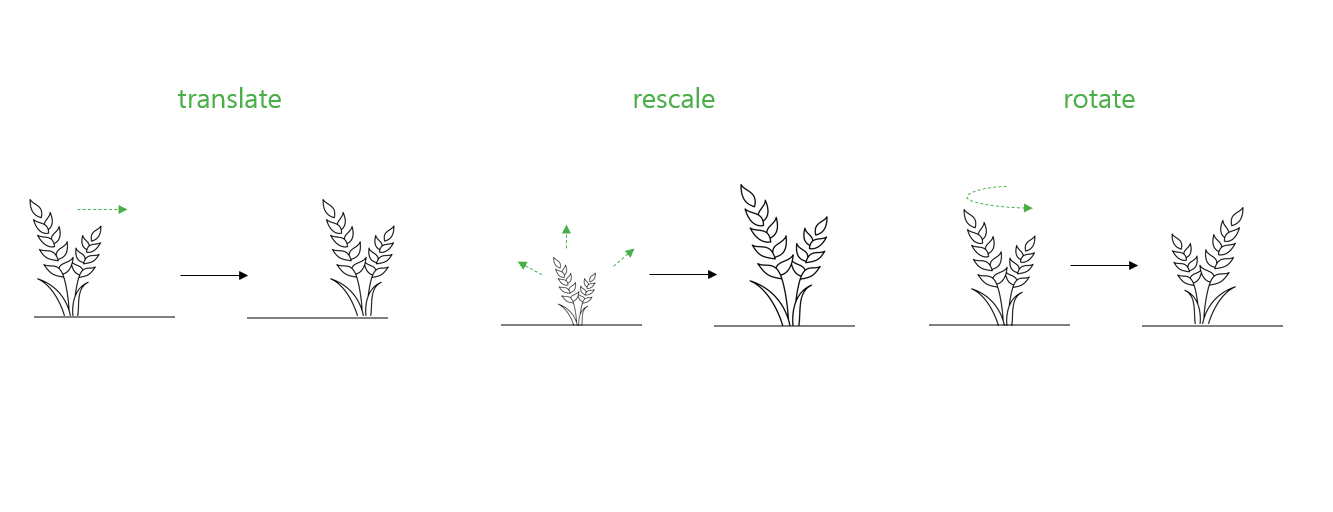
Transformations are stored in a dict, which is stored at key "transformations" in the geometry entry. Structure of transformations :
transformations = {
    "scenes unit": { specy ID: "metric unit", ...},
    "rescale": { specy ID: float, ...},
    "translate": { specy ID: 3-tuple (x,y,z), ...},
    "xyz orientation":  { specy ID: "x+ = NEWS", ...},
}
Main scenes
[13]:
spheresize = (2., 1.)
scene1 = {
    0: [random_triangle_generator(spheresize=spheresize, worldsize=(0,10)) for i in range(20)]
}
scene2 = {
    0: [random_triangle_generator(spheresize=spheresize, worldsize=(10,20)) for i in range(20)]
}

geometry = {"scenes": [scene1, scene2] }
[14]:
lighting = LightVegeManager(lightmodel="caribu")
lighting.build(geometry=geometry)
SceneWidget(lighting.to_plantGL(),
            position=(0.0, 0.0, 0.0),
            size_display=(600, 400),
            plane=True,
            size_world = 50.,
            axes_helper=True)
[14]:
3.6.1. Translate
The translation vector is a 3-tuple (x,y,z). Transformations is a dict in the geometry dict.
[15]:
tvec = (10., -10., 10.)
transformations = {
    "translate": {
        0: tvec
    }
}
geometry = {"scenes": [scene1, scene2] , "transformations": transformations}
[16]:
lighting = LightVegeManager(lightmodel="caribu")
lighting.build(geometry=geometry)
SceneWidget(lighting.to_plantGL(),
            position=(0.0, 0.0, 0.0),
            size_display=(600, 400),
            plane=True,
            size_world = 50.,
            axes_helper=True)
[16]:
3.6.2. Rescale following metric unit
You can precise the metric unit of each scene from this list: "mm", "cm", "dm", "m", "dam", "hm", "km". By default the merged scene is in m but you can change its unit when you create an instance.
[17]:
transformations = {
    "scenes unit": {
        0: "dm"
    }
}
geometry = {"scenes": [scene1, scene2] , "transformations": transformations}
[18]:
lighting = LightVegeManager(lightmodel="caribu", main_unit="m")
lighting.build(geometry=geometry)
SceneWidget(lighting.to_plantGL(),
            position=(0.0, 0.0, 0.0),
            size_display=(600, 400),
            plane=True,
            size_world = 50.,
            axes_helper=True)
[18]:
3.6.3. Rescale by a scalar factor
[19]:
transformations = {
    "rescale": {
        0: 2.,
    }
}
geometry = {"scenes": [scene1, scene2] , "transformations": transformations}
[20]:
lighting = LightVegeManager(lightmodel="caribu")
lighting.build(geometry=geometry)
SceneWidget(lighting.to_plantGL(),
            position=(0.0, 0.0, 0.0),
            size_display=(600, 400),
            plane=True,
            size_world = 50.,
            axes_helper=True)
[20]:
3.6.4. Rotate
Finally, you can also rotate the scene around the z axis, in order to match the x+ convention for each input scene. You have the choice between: - "x+ = N" - "x+ = S" - "x+ = E" - "x+ = W"
The merged scene convention is x+ = N, which the convention in RATP and CARIBU.
[21]:
transformations = {
    "xyz orientation": {
        0: "x+ = S",
        1: "x+ = E",
    }
}
geometry = {"scenes": [scene1, scene2] , "transformations": transformations}
[22]:
lighting = LightVegeManager(lightmodel="caribu")
lighting.build(geometry=geometry)
SceneWidget(lighting.to_plantGL(),
            position=(0.0, 0.0, 0.0),
            size_display=(600, 400),
            plane=True,
            size_world = 50.,
            axes_helper=True)
[22]: