4. Light models options: how to set up the light models
4.1. Content
CARIBU
Computing the sun position
Grid of virtual sensors
Other parameters
RATP
Leaf angle distribution
Triangles tesselation in a grid
Other parameters
4.2. Introduction
During our use of lightvegemanager, we added special features for each known light models. This notebook gives you a small introduction to them.
The parameters of those features are stored in a dict.
[1]:
import os
from lightvegemanager.LVM import LightVegeManager
from pgljupyter import SceneWidget
from lightvegemanager.trianglesmesh import random_triangle_generator
4.3. CARIBU
This is the complete parameters you can provide with CARIBU:
caribu_args = {
                    "sun algo" : "ratp",
                    "sun algo" : "caribu",

                    "caribu opt" : {
                                    band0 = (reflectance, transmittance),
                                    band1 = (reflectance, transmittance),
                                    ...
                                    },
                    "debug" : bool,
                    "soil mesh" : bool,
                    "sensors" : ["grid", dxyz, nxyz, orig, vtkpath, "vtk"]
                }
4.3.1. Computing the sun position
In order to compute the sun position, you can use either the algorithm from RATP or CARIBU. The (x, y, z) output is formatted in CARIBU format.
[2]:
caribu_args = { "sun algo" : "caribu" }

lighting = LightVegeManager(lightmodel="caribu", lightmodel_parameters=caribu_args)
lighting.build(geometry=[(0., 0., 0.), (1., 0., 0.), (1., 1., 1.)])
energy = 500.
hour = 15
day = 264
lighting.run(energy=energy, hour=hour, day=day)

sun_caribu = lighting.sun
print(sun_caribu)
(0.33506553253259913, -0.8798617206271511, -0.3370080733212115)
[3]:
caribu_args = { "sun algo" : "ratp" }

lighting = LightVegeManager(lightmodel="caribu", lightmodel_parameters=caribu_args)
lighting.build(geometry=[(0., 0., 0.), (1., 0., 0.), (1., 1., 1.)])
energy = 500.
hour = 15
day = 264
lighting.run(energy=energy, hour=hour, day=day)

sun_ratp = lighting.sun
print(sun_ratp)
(0.33241183146897624, -0.8800565622452903, -0.3391206592769639)
[4]:
dist = (sum([ (x-y)**2 for x,y in zip(sun_ratp, sun_caribu) ])) ** (1/2)
print("euclidean dist = ",dist," m")
euclidean dist = 0.003397515564596359 m
4.3.2. Grid of virtual sensors
If you can to match a grid of voxels, you can generate a set of virtual sensors following a 3D grid. You need to precise the dimension of the grid: - dxyz: [dx, dy, dz] size of one voxel - nxyz: [nx, ny, nz] number of voxels on each xyz axis - orig: [0x, 0y, 0z] origin point of the grid
You can write a geometric visualisation of the sensors in VTK format, or export a plantGL Scene of with the method to_VTK and to_plantGL and the option virtual_sensors=True.
Also, you can provide a grid following some or all of the input scenes by defining a dict. For example:
sensors = {
        scene_id_1 : ["grid", dxyz, nxyz, orig],
        scene_id_2 : ["grid", dxyz, nxyz, [x + 0.5 for x in orig] ]
        }
[3]:
# grid dimensions
dxyz = [1.] * 3
nxyz = [5, 5, 7]
orig = [0.] * 3
[4]:
# random triangles
nb_triangles = 50
spheresize = (1., 0.3) # vertices of triangles are the sphere surface
triangles = []
for i in range(nb_triangles):
    triangles.append(random_triangle_generator(worldsize=(0., 5.), spheresize=spheresize))
[5]:
caribu_args = { "sensors" : ["grid", dxyz, nxyz, orig] }

lighting = LightVegeManager(lightmodel="caribu", lightmodel_parameters=caribu_args, environment={"infinite":True})
lighting.build(geometry=triangles)
You can visualize the grid of sensors with plantGL through the method plantGL_sensors
[6]:
SceneWidget(lighting.to_plantGL(virtual_sensors=True)[1],
            position=(-2.5, -2.5, 0.0),
            size_display=(600, 400),
            plane=True,
            size_world = 10,
            axes_helper=True)
[6]:
The lighting results are stored in sensors_outputs
[9]:
energy = 500.
hour = 15
day = 264
lighting.run(energy=energy, hour=hour, day=day)

print(lighting.sensors_outputs)
{'par': {0: 0.5357183881257019, 1: 0.4686494843618967, 2: 0.43585410695767945, 3: 0.7773054342426935, 4: 0.7653565097977126, 5: 0.8234079750501035, 6: 0.4758490954881396, 7: 0.5623902514683649, 8: 0.6648303684704121, 9: 0.7523744755517257, 10: 0.757628513619047, 11: 0.7759095328197766, 12: 0.5042164344666725, 13: 0.5273952940619577, 14: 0.618460535502636, 15: 0.7471856369784272, 16: 0.7002461334186968, 17: 0.8083881379807872, 18: 0.5731391756180516, 19: 0.6005392197593685, 20: 0.5830230691495272, 21: 0.668598834740319, 22: 0.7491856052337844, 23: 0.7778896638896193, 24: 0.45941263771422963, 25: 0.5231994757990336, 26: 0.5730702589058677, 27: 0.6802830730422291, 28: 0.768563206195468, 29: 0.8783160299524551, 30: 0.4879256729568832, 31: 0.3986838108537597, 32: 0.5107879595674222, 33: 0.7104544959233176, 34: 0.6104289235914225, 35: 0.8335714361222757, 36: 0.49402264002060914, 37: 0.5236661627298473, 38: 0.5559437694123442, 39: 0.7801809144392181, 40: 0.7482355370820352, 41: 0.8703959530204384, 42: 0.4437212327094782, 43: 0.48943914843165776, 44: 0.6265471398912993, 45: 0.6242676962673399, 46: 0.6242541832847409, 47: 0.8029465687456536, 48: 0.4552489809791363, 49: 0.5706269863386113, 50: 0.6707753329147661, 51: 0.6173647331272717, 52: 0.5817093348224309, 53: 0.8761273435958801, 54: 0.39061205289281303, 55: 0.4876144245567773, 56: 0.6081462607497906, 57: 0.6490748578167109, 58: 0.6112989310198034, 59: 0.9081399625253275, 60: 0.4382387194995509, 61: 0.24511969967129915, 62: 0.5564013821314899, 63: 0.6811375757235048, 64: 0.770734538810677, 65: 0.6876474556435463, 66: 0.4333876306307797, 67: 0.5117511864924423, 68: 0.5452643050348251, 69: 0.5855297120040052, 70: 0.7679378169458118, 71: 0.7374054106105965, 72: 0.46718762617607673, 73: 0.515406942360565, 74: 0.5498630958709402, 75: 0.38157016078052153, 76: 0.6230183331063252, 77: 0.9297880197486428, 78: 0.42012696485414797, 79: 0.43441190921900263, 80: 0.576547648435128, 81: 0.575563926783583, 82: 0.5587431661289568, 83: 0.9428844615982549, 84: 0.40797647513225416, 85: 0.32045180842520204, 86: 0.3860501936085704, 87: 0.6035746806015782, 88: 0.6761415094988514, 89: 0.9147231881446279, 90: 0.35723846481058197, 91: 0.29971902254716964, 92: 0.4617676006672053, 93: 0.6670186733643282, 94: 0.7729889949287282, 95: 0.8223626142139061, 96: 0.43689040185742767, 97: 0.5034266289477778, 98: 0.614485119215983, 99: 0.6753609146208617, 100: 0.8209389374222003, 101: 0.88137358368075, 102: 0.5060744695288328, 103: 0.5006922321596806, 104: 0.5450143532935812, 105: 0.669825913948119, 106: 0.7948585486270389, 107: 0.9497236962858565, 108: 0.5240235293870577, 109: 0.5291828813059647, 110: 0.5584025594129878, 111: 0.7009911880575855, 112: 0.6644575143621863, 113: 0.896722396622886, 114: 0.48066310311501675, 115: 0.45339172597584754, 116: 0.4928664818657807, 117: 0.6921498380364002, 118: 0.6582322232034805, 119: 0.8062622917317241, 120: 0.4165301298570477, 121: 0.47752211531730254, 122: 0.5422072915168136, 123: 0.7320985553256096, 124: 0.760961505134305, 125: 0.8425522336315453, 126: 0.48285036844495494, 127: 0.4897295356464291, 128: 0.6751897497018744, 129: 0.7650357314236249, 130: 0.6888417962718921, 131: 0.9099594684378505, 132: 0.4801370709108044, 133: 0.5233846696457297, 134: 0.5942217135899492, 135: 0.7384234333722701, 136: 0.8064837117567087, 137: 0.955340358423788, 138: 0.5755258055313021, 139: 0.5351956047253674, 140: 0.5430459909905389, 141: 0.7603523762894485, 142: 0.8096038729562012, 143: 0.9210479253387107, 144: 0.49256349385820036, 145: 0.4352151194578986, 146: 0.4353486297408457, 147: 0.7458275318718196, 148: 0.7991276473463365, 149: 0.9117731862505419}}
You can also visualize the results in the plantGL scene
[10]:
SceneWidget(lighting.to_plantGL(lighting=True, virtual_sensors=True)[1],
            position=(-2.5, -2.5, 0.0),
            size_display=(600, 400),
            plane=True,
            size_world = 10,
            axes_helper=True)
[10]:
[11]:
scene, sensors = lighting.to_plantGL(lighting=True, virtual_sensors=True)
SceneWidget(scene + sensors,
            position=(-2.5, -2.5, 0.0),
            size_display=(600, 400),
            plane=True,
            size_world = 10,
            axes_helper=True)
[11]:
4.3.3. Other parameters
In additional features, you can activate the debug mode in CARIBU, which describe the internal steps.
[6]:
caribu_args = { "debug" : True }

lighting = LightVegeManager(lightmodel="caribu", lightmodel_parameters=caribu_args)
lighting.build(geometry=[(0., 0., 0.), (1., 0., 0.), (1., 1., 1.)])

energy = 500.
hour = 15
day = 264
lighting.run(energy=energy, hour=hour, day=day)
Prepare scene 1
done
---------------------------------------------------------------------------
FileNotFoundError                         Traceback (most recent call last)
Cell In[6], line 9
      7 hour = 15
      8 day = 264
----> 9 lighting.run(energy=energy, hour=hour, day=day)

File c:\users\mwoussen\cdd\codes\dev\lightvegemanager\src\lightvegemanager\tool.py:533, in LightVegeManager.run(self, energy, day, hour, parunit, truesolartime, id_sensors)
    531 if sun_sky_option == "mix":
    532     start = time.time()
--> 533     raw_sun, aggregated_sun = run_caribu(*arg)
    534     arg[0] = c_scene_sky
    535     raw_sky, aggregated_sky = run_caribu(*arg)

File c:\users\mwoussen\cdd\codes\dev\lightvegemanager\src\lightvegemanager\CARIBUinputs.py:370, in run_caribu(c_scene, direct_active, infinite, sensors, energy)
    329 """runs caribu depending on input options
    330
    331 :param c_scene: instance of CaribuScene containing geometry, light source(s), opt etc...
   (...)
    367 :rtype: dict of dict, dict of dict
    368 """
    369 if sensors is None :
--> 370     raw, aggregated = c_scene.run(direct=direct_active, infinite=infinite)
    371 else :
    372     raw, aggregated = c_scene.run(direct=direct_active, infinite=infinite,
    373                                                         sensors=sensors)

File ~\AppData\Local\miniconda3\envs\mobidivpy37\lib\site-packages\alinea.caribu-8.0.7-py3.8.egg\alinea\caribu\CaribuScene.py:568, in CaribuScene.run(self, direct, infinite, d_sphere, layers, height, screen_size, screen_resolution, sensors, split_face, simplify)
    566         self.canfile = os.path.join(self.tempdir,'cscene.can')
    567         self.optfile = os.path.join(self.tempdir,'band0.opt')
--> 568         write_scene(triangles, materials, canfile = self.canfile, optfile = self.optfile)
    570 else:
    571     # self.materialvalues is a cache for the computation of the material list
    572     materials = self.materialvalues

File ~\AppData\Local\miniconda3\envs\mobidivpy37\lib\site-packages\alinea.caribu-8.0.7-py3.8.egg\alinea\caribu\caribu.py:177, in write_scene(triangles, materials, canfile, optfile)
    175 o_string, labels = opt_string_and_labels(materials)
    176 can_string = triangles_string(triangles, labels)
--> 177 open(canfile,'w').write(can_string)
    178 open(optfile,'w').write(o_string)

FileNotFoundError: [Errno 2] No such file or directory: './caribuscene_2672400716080\\cscene.can'
You can also use the soilmesh option and get the lighting hitting the soil. The method soilenergy get you access to its result.
[12]:
caribu_args = { "soil mesh" : True }

lighting = LightVegeManager(lightmodel="caribu", lightmodel_parameters=caribu_args)
lighting.build(geometry=[(0., 0., 0.), (1., 0., 0.), (1., 1., 1.)])

energy = 500.
hour = 15
day = 264
lighting.run(energy=energy, hour=hour, day=day)

print(lighting.soilenergy)
{'Qi': 0.6750540873627096, 'Einc': 0.6750540873627096}
4.4. RATP
This is the complete parameters you can provide with CARIBU:
ratp_args = {
                # Grid specifications
                "voxel size" : [dx, dy, dz],
                "voxel size" : "dynamic",

                "full grid" : bool,

                "origin" : [xorigin, yorigin, zorigin],
                "origin" : [xorigin, yorigin],

                "number voxels" : [nx, ny, nz],
                "grid slicing" : "ground = 0."
                "tesselation level" : int

                # Leaf angle distribution
                "angle distrib algo" : "compute global",
                "angle distrib algo" : "compute voxel",
                "angle distrib algo" : "file",

                "nb angle classes" : int,
                "angle distrib file" : filepath,

                # Vegetation type
                "soil reflectance" : [reflectance_band0, reflectance_band1, ...],
                "reflectance coefficients" : [reflectance_band0, reflectance_band1, ...],
                "mu" : [mu_scene0, mu_scene1, ...]
            }
4.4.1. Leaf angle distribution
Leaf angle distribution can be generated in 3 ways: - from a file, one distribution per specy - global and dynamically, it generates a distribution from a triangles mesh for each specy - per voxel and dynamically, it generates a distribution from the triangles located in each voxel
[2]:
# random triangles
nb_triangles = 50
spheresize = (1., 0.3) # vertices of triangles are the sphere surface
worldsize = (0., 5.)
triangles = [random_triangle_generator(worldsize=worldsize, spheresize=spheresize) for i in range(nb_triangles)]
4.4.1.1. File
You need the flag "file" and to specify the file path.
[15]:
filepath = os.path.join(os.path.dirname(os.path.abspath("")), "data", "luzerne_angle_distrib.data")
ratp_parameters = { "angle distrib algo" : "file", "angle distrib file" : filepath }

# initialize the instance
lighting = LightVegeManager(lightmodel="ratp", lightmodel_parameters=ratp_parameters)

# build the scene
lighting.build(geometry=triangles)

print(lighting.leafangledistribution)
{'global': [[0.1382, 0.1664, 0.1972, 0.1925, 0.1507, 0.0903, 0.0425, 0.0172, 0.005]]}
4.4.1.2. Global distribution
You need the flag "compute global" and to specify the number of angle classes you need.
[3]:
ratp_parameters = { "angle distrib algo" : "compute global", "nb angle classes" : 9 }

# initialize the instance
lighting = LightVegeManager(lightmodel="ratp", lightmodel_parameters=ratp_parameters)

# build the scene
lighting.build(geometry=triangles)

print(lighting.leafangledistribution)
{'global': [[0.0, 0.01403472520994376, 0.14553389876181141, 0.13870880399511626, 0.17786938035077418, 0.06842434118299212, 0.09608726894836216, 0.20983153542452182, 0.14951004612647875]]}
4.4.1.3. Local distribution
You need the flag "compute voxel" and to specify the number of angle classes you need. You will get one distribution for each voxel of your grid and each specy.
[6]:
ratp_parameters = {
                    "voxel size" : [1., 1., 1.],
                    "angle distrib algo" : "compute voxel",
                    "nb angle classes" : 9
                    }

# initialize the instance
lighting = LightVegeManager(lightmodel="ratp", lightmodel_parameters=ratp_parameters)

# build the scene
lighting.build(geometry=triangles)

print("Global")
print(lighting.leafangledistribution["global"])
print("\n\n Local")
for a in lighting.leafangledistribution["voxel"]:
    print(a[0])
Global
[[0.009674637223767685, 0.06468549489243054, 0.10705660994810652, 0.10196105003699654, 0.07575759861707439, 0.3044721953841436, 0.06446975879644407, 0.14828246866341796, 0.12364018643761852]]


 Local
[0. 0. 0. 0. 0. 0. 0. 1. 0.]
[0. 0. 0. 0. 0. 0. 0. 0. 1.]
[0. 0. 1. 0. 0. 0. 0. 0. 0.]
[0.         0.         0.55805526 0.44194474 0.         0.
 0.         0.         0.        ]
[0. 0. 0. 0. 0. 0. 1. 0. 0.]
[0. 0. 0. 0. 1. 0. 0. 0. 0.]
[0. 0. 0. 0. 0. 1. 0. 0. 0.]
[0. 0. 0. 0. 0. 0. 0. 1. 0.]
[0. 0. 0. 0. 0. 0. 0. 0. 1.]
[0. 0. 0. 0. 1. 0. 0. 0. 0.]
[0. 1. 0. 0. 0. 0. 0. 0. 0.]
[0. 1. 0. 0. 0. 0. 0. 0. 0.]
[0. 1. 0. 0. 0. 0. 0. 0. 0.]
[0. 0. 0. 1. 0. 0. 0. 0. 0.]
[0. 1. 0. 0. 0. 0. 0. 0. 0.]
[0. 0. 0. 0. 1. 0. 0. 0. 0.]
[0.         0.         0.41000514 0.58999486 0.         0.
 0.         0.         0.        ]
[0. 0. 0. 0. 0. 1. 0. 0. 0.]
[0. 0. 0. 0. 0. 0. 0. 0. 1.]
[0. 0. 1. 0. 0. 0. 0. 0. 0.]
[0. 0. 0. 0. 1. 0. 0. 0. 0.]
[0. 0. 0. 0. 0. 0. 0. 1. 0.]
[1. 0. 0. 0. 0. 0. 0. 0. 0.]
[0. 0. 0. 0. 1. 0. 0. 0. 0.]
[0. 0. 0. 0. 1. 0. 0. 0. 0.]
[0. 0. 0. 0. 0. 1. 0. 0. 0.]
[0.         0.         0.58893012 0.41106988 0.         0.
 0.         0.         0.        ]
[0. 0. 0. 0. 1. 0. 0. 0. 0.]
[0. 0. 0. 0. 0. 1. 0. 0. 0.]
[0.         0.30170822 0.         0.         0.         0.
 0.         0.         0.69829178]
[0.         0.         0.         0.17828753 0.         0.
 0.         0.         0.82171247]
[0. 0. 0. 1. 0. 0. 0. 0. 0.]
[0. 0. 0. 0. 0. 1. 0. 0. 0.]
[0. 0. 0. 0. 0. 0. 0. 0. 1.]
[0. 0. 0. 1. 0. 0. 0. 0. 0.]
[0. 1. 0. 0. 0. 0. 0. 0. 0.]
[1. 0. 0. 0. 0. 0. 0. 0. 0.]
[0. 0. 0. 0. 0. 0. 0. 1. 0.]
[0. 0. 0. 1. 0. 0. 0. 0. 0.]
[0. 0. 0. 0. 0. 1. 0. 0. 0.]
[0. 0. 0. 0. 0. 0. 0. 0. 1.]
[0. 0. 1. 0. 0. 0. 0. 0. 0.]
[0. 0. 0. 0. 0. 0. 0. 1. 0.]
[0. 0. 0. 0. 0. 0. 1. 0. 0.]
For visualization of the situation
[7]:
SceneWidget(lighting.to_plantGL(printtriangles=True, printvoxels=True),
            position=(-2.5, -2.5, 0.0),
            size_display=(600, 400),
            plane=True,
            size_world = 10,
            axes_helper=True)
[7]:
4.4.2. Triangles tesselation in a grid
You can reduce the error while transferring a triangle mesh to a voxel mesh by subdividing triangles across multiple voxels.
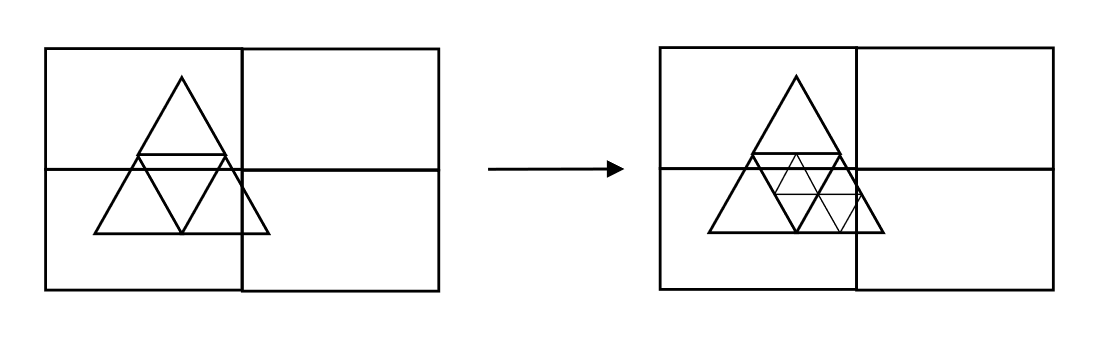
You only need to precise how many times you want to subdivide the triangles.
[21]:
ratp_parameters = { "voxel size" : [1., 1., 1.], "tesselation level" : 7 }

# initialize the instance
lighting = LightVegeManager(lightmodel="ratp", lightmodel_parameters=ratp_parameters)

# build the scene
lighting.build(geometry=triangles)

SceneWidget(lighting.to_plantGL(printtriangles=True, printvoxels=True),
            position=(-2.5, -2.5, 0.0),
            size_display=(600, 400),
            plane=True,
            size_world = 10,
            axes_helper=True)
[21]:
4.4.3. Other parameters
By default, the number of voxels is dynamically computed following the voxel size and mesh limits, but you can force its number.
Voxel size can also be dynamically computed and is based on 3 times the longest triangle.